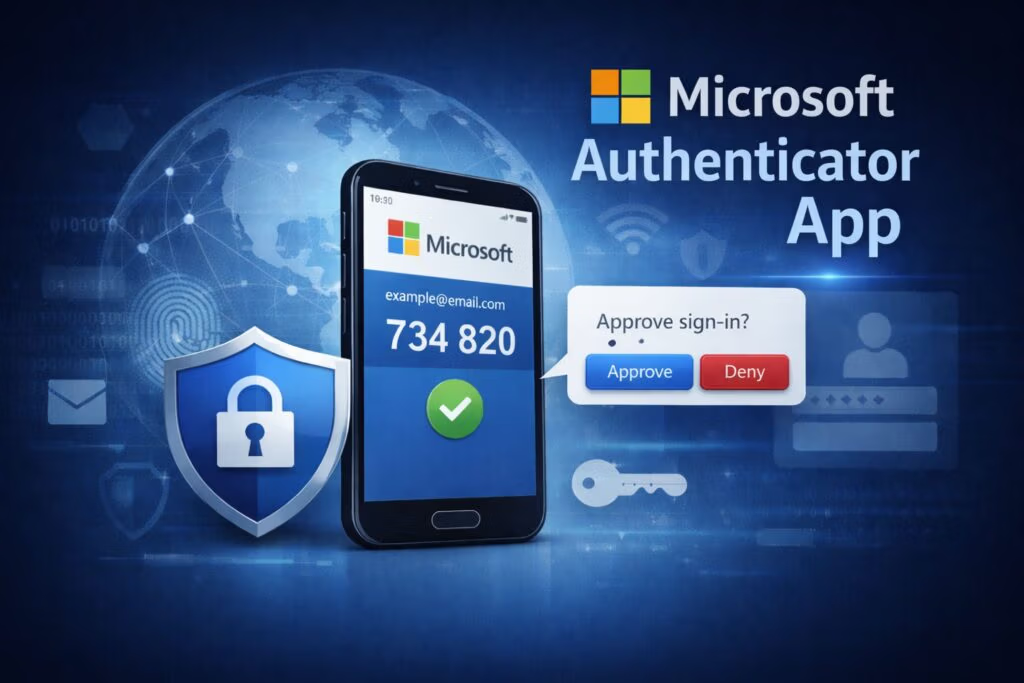
Microsoft Authenticator is a free multi-factor authentication (MFA) app developed by Microsoft that helps protect online accounts from unauthorized access. It adds an additional layer of security beyond passwords by using one-time verification codes, push notifications, number matching, and passwordless sign-in.
The app is widely used for Microsoft services such as Outlook, Microsoft 365, OneDrive, Teams, Xbox, and Windows accounts. It also supports many third-party websites and applications including Google, Facebook, Amazon, and banking platforms that use the Time-Based One-Time Password (TOTP) standard.
Compared to traditional SMS-based authentication, Microsoft Authenticator provides stronger protection against phishing attacks, credential theft, and SIM swap attacks while delivering a faster and more convenient login experience.
Quick Answer: What Does Microsoft Authenticator Do?
Microsoft Authenticator secures online accounts by requiring an additional verification step beyond passwords. It can generate one-time security codes, send push notifications for login approval, and support passwordless sign-in using biometrics or device PIN verification.
- Quick Answer: What Does Microsoft Authenticator Do?
- How Microsoft Authenticator Works
- Key Features and Benefits
- Is Microsoft Authenticator Safe?
- Why Authenticator Apps Are Safer Than SMS Authentication
- Where You Can Use Microsoft Authenticator
- How to Set Up Microsoft Authenticator
- How to Use Microsoft Authenticator
- Microsoft Authenticator vs Google Authenticator vs Authy
- Which Authenticator App Is Best?
- Limitations of Microsoft Authenticator
- Real-World Use Cases
- Frequently Asked Questions
- Final Verdict
How Microsoft Authenticator Works
Traditional account security relies on a username and password. However, passwords alone are no longer sufficient against modern cyber threats such as phishing, credential stuffing, and password breaches.
Microsoft Authenticator strengthens security by adding a second layer of identity verification through several authentication methods.
Time-Based One-Time Passwords (TOTP)
The app generates a unique six-digit verification code that refreshes every 30 seconds. Users enter this temporary code after their password to complete the sign-in process.
Because these codes are generated directly on the device rather than transmitted through SMS, they are significantly more secure against interception.
Push Notifications
For supported services, Microsoft Authenticator can send a push notification directly to the user’s phone whenever a login attempt occurs.
Instead of manually typing a code, users simply tap:
- Approve
- Deny
This method provides both convenience and improved security.
In many cases, push notifications do not require users to enter their password beforehand. However, some services may still require password entry before sending the authentication request.
Number Matching
To improve protection against accidental approval and phishing attacks, Microsoft Authenticator supports number matching verification.
During login, the sign-in screen displays a number. The user must select the matching number inside the app before the login request is approved.
This additional step significantly reduces the risk of fraudulent login approvals.
Passwordless Sign-In
Microsoft Authenticator also supports passwordless authentication for Microsoft accounts.
Instead of entering a password, users verify their identity using:
- Fingerprint authentication
- Face recognition
- Device PIN
This reduces password fatigue while improving security and convenience.
Key Features and Benefits
Enhanced Security
Microsoft Authenticator protects against:
- Phishing attacks
- Credential stuffing
- Password theft
- SIM swap attacks
- Unauthorized account access
Since authentication requests are tied directly to the user’s device, attackers generally cannot gain access without physical control of the phone.
Offline TOTP Authentication
Microsoft Authenticator can generate verification codes even without internet access or cellular service.
The app uses a time-based algorithm and secret key stored securely on the device to generate one-time passcodes offline.
This makes it reliable for travelers or users in low-connectivity environments.
Push Notification Login Approval
Push notifications simplify the sign-in process by allowing users to approve login attempts with a single tap instead of manually entering verification codes.
This feature is one of Microsoft Authenticator’s major advantages over some competing authenticator apps.
Passwordless Login Support
Microsoft Authenticator supports passwordless authentication for Microsoft accounts and supported services.
Instead of remembering complex passwords, users can securely sign in using biometrics or device PIN verification.
Benefits include:
- Faster sign-in
- Reduced password fatigue
- Lower phishing risk
- Improved user convenience
Cloud Backup & Recovery
The app includes encrypted cloud backup functionality that allows users to restore accounts when switching devices or recovering from phone loss.
Backup storage differs by platform:
- Android: Microsoft cloud backup
- iOS: Apple iCloud backup
This helps reduce the risk of permanently losing authentication access.
Cross-Platform Compatibility
Although optimized for Microsoft services, Microsoft Authenticator also works with many third-party platforms that support TOTP authentication.
Examples include:
- Amazon
- Financial institutions
- Cryptocurrency platforms
Cost Effective
Microsoft Authenticator is completely free to download and use on both Android and iOS devices.
Is Microsoft Authenticator Safe?
Yes. Microsoft Authenticator is considered one of the safest authentication methods available for protecting online accounts.
Unlike SMS-based verification systems, authentication codes are generated directly on the user’s device rather than transmitted through mobile carriers.
Key security protections include:
- One-time passcodes (TOTP)
- Push notification approval
- Number matching verification
- Passwordless sign-in
- Biometric authentication
- Encrypted cloud backup
These features help protect users against:
- Phishing attacks
- Credential theft
- SIM swap attacks
- Password reuse attacks
For maximum security, users should also enable:
- Fingerprint lock
- Face ID
- Strong device PIN
- Screen lock protection
Why Authenticator Apps Are Safer Than SMS Authentication
SMS-based authentication sends verification codes through mobile carriers, making them vulnerable to SIM swapping and message interception.
In a SIM swap attack, criminals fraudulently transfer a victim’s phone number to another device to intercept SMS verification codes.
In contrast, authenticator apps like Microsoft Authenticator generate verification codes directly on the device, making remote interception significantly more difficult.
As a result, authenticator apps are widely considered safer than SMS-based two-factor authentication.
Where You Can Use Microsoft Authenticator
Microsoft Authenticator works with many Microsoft and non-Microsoft services.
Microsoft Services
- Outlook
- Microsoft 365
- OneDrive
- Teams
- Xbox
- Windows accounts
Third-Party Services
- Amazon
- Banking platforms
- Cryptocurrency exchanges
- VPN services
The app supports most platforms that use the TOTP authentication standard.
How to Set Up Microsoft Authenticator
Setting up Microsoft Authenticator is straightforward.
Step 1: Download the App
Install Microsoft Authenticator from:
- Google Play Store
- Apple App Store
Step 2: Open Account Security Settings
Navigate to the security settings of the account you want to protect.
Look for:
- Two-Factor Authentication
- Multi-Factor Authentication
- Security Verification
Step 3: Enable MFA
Enable two-factor authentication to generate a setup QR code.
Step 4: Scan the QR Code
Open Microsoft Authenticator and scan the QR code using the app.
This links the account securely to your device.
How to Use Microsoft Authenticator
After setup, signing in typically involves the following process:
- Enter your username and password
- Open Microsoft Authenticator when prompted
- Approve the push notification or enter the TOTP code
- Complete authentication
Depending on the service, users may:
- Approve a push notification
- Enter a six-digit TOTP code
- Complete number matching verification
- Use passwordless sign-in
Microsoft Authenticator vs Google Authenticator vs Authy
Below is a comparison of the three most popular authenticator apps:
| Feature | Microsoft Authenticator | Google Authenticator | Authy (Twilio) |
| Online TOTP | Yes | Yes | Yes |
| Push Notification Login | Yes | No | No |
| Passwordless Login | Yes | No | No |
| Biometric/App Lock | Yes | Yes | Yes |
| Works Offline | Yes | Yes | Yes |
| Cloud Backup | Yes | Yes | Yes (encrypted) |
| Cost | Free | Free | Free |
| Multi-Device Support | Limited | Limited | Yes (best) |
| Account Recovery | Microsoft Account | Google Account | Backup Password |
| Passkey Support | Yes | Limited | No |
| Best For | Microsoft ecosystem users | Simplicity | Backup & multi-device users |
| Unique Advantages | Push notification, passwordless login | Simple. lightweight, widely compatible | Muilti-device support, encrypted backup |
Which Authenticator App Is Best?
Choose Microsoft Authenticator if you want:
- Push notifications
- Passwordless login
- Microsoft ecosystem integration
- Advanced security features
Choose Google Authenticator if you want:
- Lightweight simplicity
- Minimal setup
- Basic TOTP authentication
Choose Authy if you want:
- Multi-device synchronization
- Better backup flexibility
- Cross-device convenience
Limitations of Microsoft Authenticator
Despite its strengths, Microsoft Authenticator has some limitations.
Limited Multi-Device Support
Microsoft Authenticator only supports one primary active authentication device at a time.
Users switching devices typically need to restore from backup.
Platform-Specific Backup
Backup systems differ between Android and iOS platforms.
Currently, there is limited cross-platform synchronization support.
No Export Feature
Microsoft Authenticator does not provide a direct export feature for migrating accounts to other authenticator apps.
This can make switching platforms less convenient.
Privacy Considerations
Depending on user settings and Microsoft policies, some diagnostic and usage data may be collected. Users concerned about privacy should review Microsoft’s privacy settings and permissions carefully.
Real-World Use Cases
Microsoft Authenticator is particularly useful for:
- Business professionals using Microsoft 365
- Remote workers accessing corporate systems
- Users protecting banking accounts
- Social media account security
- Online shopping accounts
- Cryptocurrency accounts
Organizations increasingly recommend authenticator apps because they provide stronger protection than passwords alone.
Frequently Asked Questions
Is Microsoft Authenticator Free?
Yes. Microsoft Authenticator is completely free to download and use on Android and iOS devices.
Can Microsoft Authenticator Work Without Internet?
Yes. The app can generate TOTP verification codes offline without internet access or cellular service.
Can Microsoft Authenticator Be Hacked?
Microsoft Authenticator is highly secure, but attackers may still target users through phishing, malware, or social engineering. Users should never approve unexpected login requests.
Is Microsoft Authenticator Better Than Google Authenticator?
Microsoft Authenticator offers more advanced features such as push notifications, number matching, and passwordless sign-in. Google Authenticator is generally preferred for its simplicity and lightweight design.
Can Microsoft Authenticator Protect Non-Microsoft Accounts?
Yes. Microsoft Authenticator works with most websites and applications that support the TOTP authentication standard.
What Happens if I Lose My Phone?
You can restore accounts using encrypted cloud backup if backup was enabled previously.
Is Microsoft Authenticator Safer Than SMS Verification?
Authenticator apps, such as Microsoft Authenticator, provides a superior layer of security compared to SMS-based method because they generate TOTP directly on your device. In contrast, security codes sent via SMS are vulnerable to SIM swapping attacks, a technique where a criminal transfers your phone number to their own device without your knowledge. If this occurs, the attacker can intercept the verification code and gain unauthorized access to your accounts.
Final Verdict
Microsoft Authenticator is one of the most feature-rich authenticator apps available today. Its support for push notifications, number matching, passwordless sign-in, and Microsoft ecosystem integration makes it an excellent choice for both personal and business users.
While alternatives such as Google Authenticator and Authy excel in simplicity or multi-device support, Microsoft Authenticator offers a strong balance of security, convenience, and advanced authentication features.
For users seeking stronger protection beyond traditional passwords and SMS verification, Microsoft Authenticator remains one of the best free authentication apps available today.