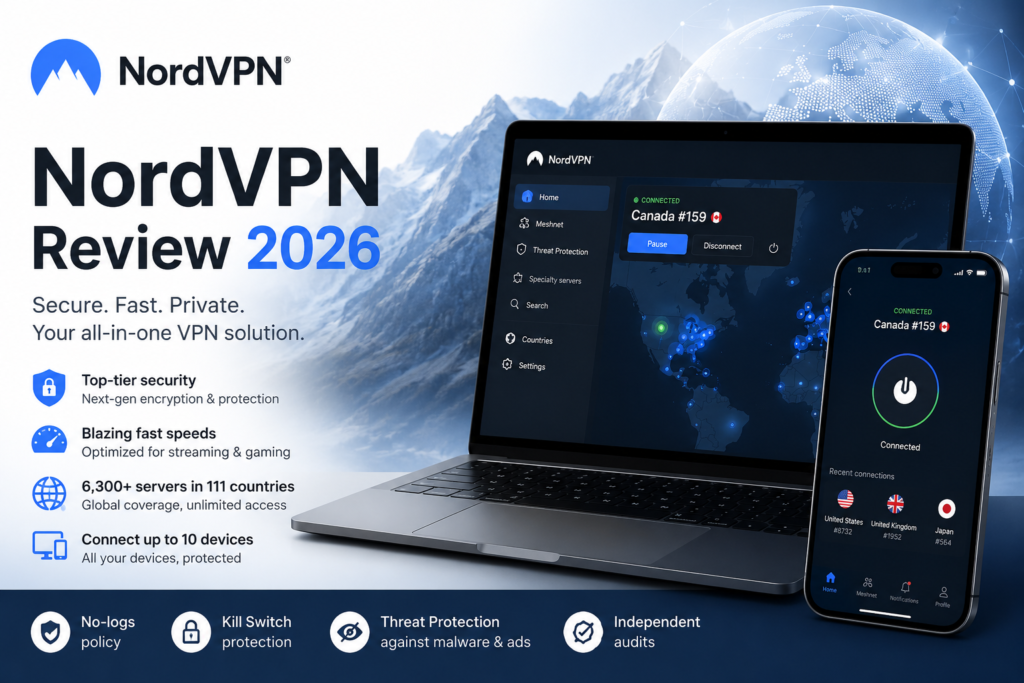
In a world where online privacy is becoming harder to maintain, VPNs have shifted from niche tools to everyday essentials. Among the many options available, NordVPN consistently stands out as one of the best talked-about VPNs on the market. But does it still live up to that reputation in 2026?
In this NordVPN Review, we’ll walk through NordVPN’s security, speed, privacy features, pricing, and ease of use, so you can decided whether it’s the right VPN for you.
Quick Answer
Yes, for most people. NordVPN remains one of the best VPNs in 2026 for most people. It combines strong security, fast performance, a large global server network, and beginner-friendly apps. Whether you want to protect your privacy on public Wi-Fi, stream securely while travelling, or simply reduce online tracking, NordVPN is a reliable, easy-to-use choice.
NordVPN at a Glance
| Feature | NordVPN |
|---|---|
| Best for | Everyday users |
| Servers | 8,800+ |
| Server locations | 224+ |
| Simultaneous devices | 10 |
| Money-back guarantee | 30 days |
| Free trial | Android (Google Play) |
| Logging | No logs (independently audited) |
| Speed | Excellent |
What Is NordVPN?
NordVPN is a virtual private network (VPN) service designed to protect your online activity, secure your internet connection, and help you access content from around the world. The company was founded in 2012 by Nord Security, a cybersecurity firm originally based in Lithuania.
NordVPN is headquartered in Panama, a country with no mandatory data-retention laws. Nord Security also operates offices in several European countries, and in 2022 it acquired VPN provider Surfshark, bringing both brands under the same corporate umbrella.
Who Is NordVPN For?
NordVPN is designed for a wide range of users, including:
- People who want safer everyday browsing
- Travelers who frequently use public Wi‑Fi
- Streamers who want access to global content libraries
- Gamers who need stable, low‑latency connections
- Households with multiple devices
- Anyone who values strong privacy and security
Its combination of ease of use, strong encryption, and fast speeds makes it suitable for both beginners and more-experienced users.
Key Features & Functionality
A Massive Global Server Network
One of NordVPN’s biggest strengths is its enormous server network. NordVPN operates one of the world’s largest VPN server networks, with more than 8,800 servers across 224+ locations. In practice, a bigger network means more nearby servers to choose from, better access to international content, less congestion during peak hours, and more consistent performance overall.
Double VPN (Multi-Hop) for Extra Security
NordVPN’s Double VPN feature is one of its most distinctive offerings. It routes your traffic through two servers instead of one, encrypting it twice before it reaches its destination. That makes it significantly harder for anyone — hackers, your ISP, or surveillance systems — to trace your activity back to you.
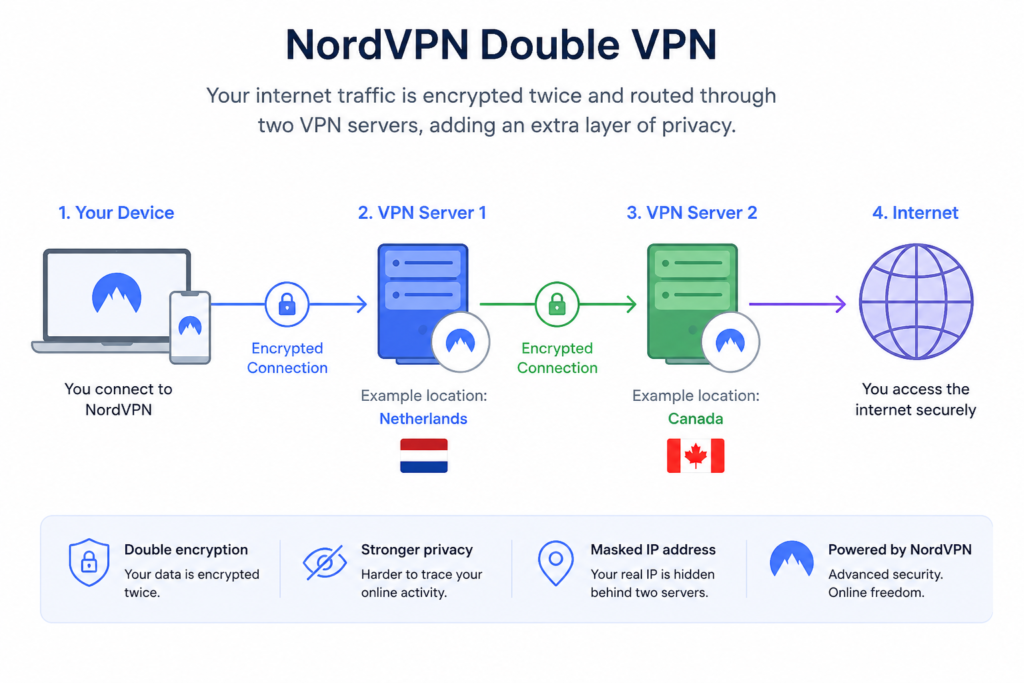
For example, imagine you’re using public Wi-Fi at an airport to check your bank balance. A standard VPN connection is already secure enough for this in most cases, but turning on Double VPN adds an extra layer of protection for anyone who wants maximum peace of mind. It’s not necessary for everyday browsing, but it’s there for users who want it.
Threat Protection Pro
Threat Protection Pro is NordVPN’s built-in anti-malware tool. It blocks ads, trackers, and malicious websites, and on supported platforms it can block malware downloads and phishing sites even when you’re not connected to the VPN. It’s a helpful bonus layer of security, but it shouldn’t replace a dedicated antivirus program.
Kill Switch
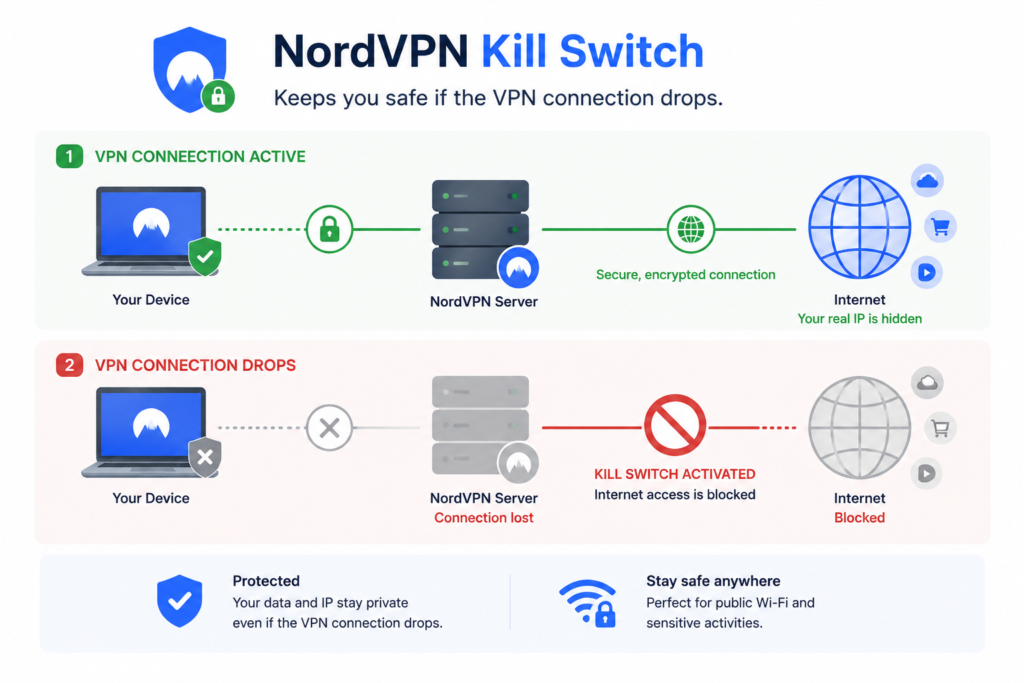
One of NordVPN’s most important security features is its Kill Switch. If your VPN connection unexpectedly drops, the Kill Switch automatically blocks your device from accessing the internet until the secure connection is restored. Without it, your real IP address and traffic could briefly become visible. This matters most when you’re on public Wi-Fi or doing anything sensitive, like online banking or accessing work files.
Meshnet
Meshnet lets you securely connect your own devices — or devices belonging to trusted friends, family, or coworkers — over the internet as if they were on the same private network.
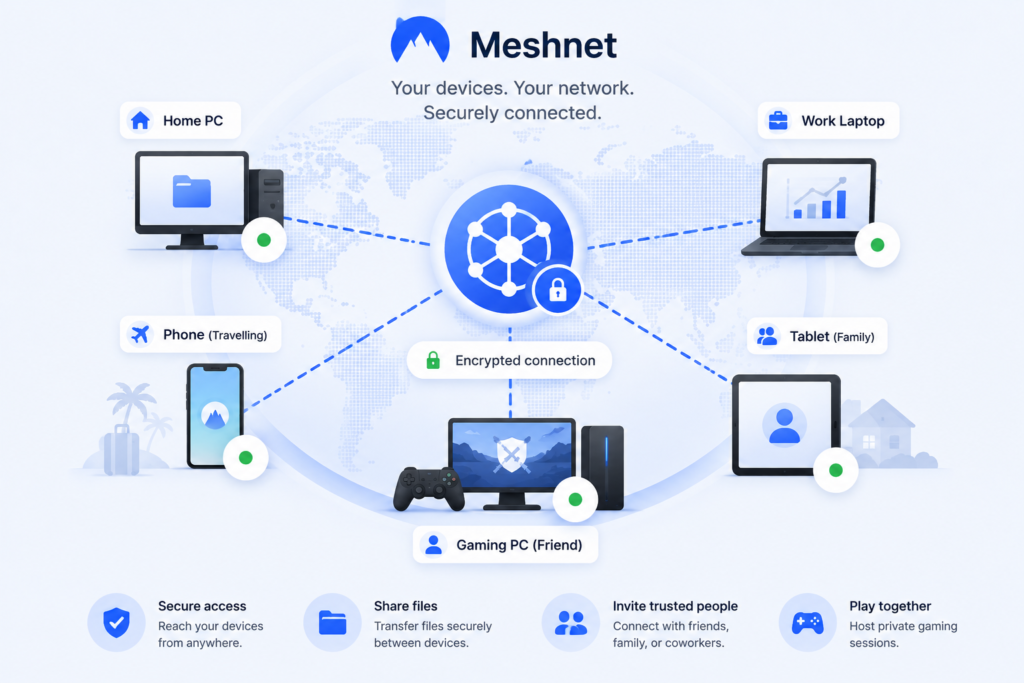
While many everyday users may never need it, Meshnet can be useful for securely accessing files on your home computer while travelling, collaborating remotely, or hosting private gaming sessions without exposing your network to the public internet.
Dark Web Monitor
Dark Web Monitor continuously checks whether the email address associated with your Nord Account appears in known data breaches circulating on the dark web.
If your information is detected, you’ll receive an alert so you can change your password and secure your affected accounts. Although it doesn’t prevent data breaches, it helps you respond sooner if your personal information has been exposed.
Additional Advanced Features
NordVPN also includes a few more advanced tools aimed at experienced users:
- Split Tunneling lets you choose which apps use the VPN and which connect directly to the internet. For example, you could protect your web browser with the VPN while letting a bandwidth-heavy app, like streaming app, use your regular internet connection.
- Dedicated IP gives you a unique IP address that isn’t shared with other NordVPN users. It is useful if you’re tired of solving CAPTCHAs or getting flagged for “suspicious logins” on banking or work sites because your IP keeps changing.
- Onion Over VPN routes your traffic through the Tor network on top of NordVPN’s encryption, for users such as journalists or activists who need an extra layer of anonymity. Most everyday users won’t need this.
- Obfuscated Servers are designed to disguise VPN traffic so it looks like regular internet traffic. They can be helpful in countries or networks where VPN use is restricted or blocked.
Broad Device Compatibility
NordVPN supports up to 10 devices on a single account, making it a good fit for families or anyone with multiple gadgets — you can cover your laptop, phone, tablet, and your family’s devices under one subscription instead of paying for several accounts.
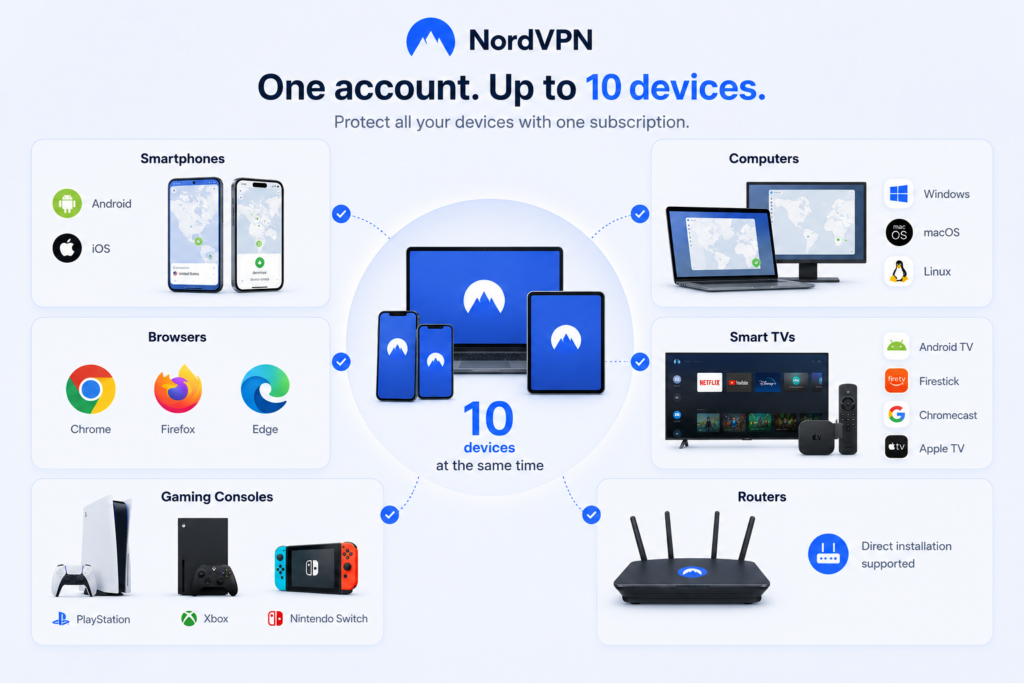
It works on:
- Smartphones: Android, iOS
- Computers: Windows, macOS, Linux
- Browsers: Chrome, Firefox, Edge
- Smart TVs: Android TV, Firestick, Chromecast, Apple TV
- Gaming consoles: PlayStation, Xbox, Nintendo Switch
- Routers: direct installation supported
VPN on Your Router
Installing NordVPN on your router encrypts the internet traffic of every device connected to your home network. This is especially useful for smart TVs, IoT devices, and consoles that don’t support VPN apps directly. It also counts as just one connection, protecting everything on the network under a single slot.
One caveat: many ISPs provide modem-router combos that restrict this kind of setup. If yours does, you may need to buy your own router and connect it to the ISP’s modem.
Security & Privacy
Industry‑Leading Encryption
NordVPN uses AES‑256 and ChaCha20, two of the most secure encryption algorithms available and widely regarded as strong encryption standards.
NordLynx: Fast and Secure
NordLynx is NordVPN’s own implementation of the WireGuard protocol, built to deliver excellent speed without compromising security. In independent testing and everyday use, NordVPN consistently ranks among the faster VPN services available.
Strict No‑Logs Policy
NordVPN maintains a strict no‑logs policy. A no-logs policy means NordVPN doesn’t track or store your browsing history, connection timestamps, or IP addresses — so even if the company were ever compelled to hand over data, there would be nothing meaningful to hand over. NordVPN’s no-logs claim has been independently audited multiple times by third-party firms, which adds a layer of verification beyond the company’s own word.
Independent Security Audits
An independent audit means outside security firms are brought in to check the company’s systems against its privacy claims, rather than everyone simply taking the company at its word. No audit can guarantee absolute privacy forever, but repeated third-party assessments like these help build trust and demonstrate an ongoing commitment to transparency.
Performance & Reliability
VPN speed can vary depending on several factors.
- Server location — closer servers mean faster speeds
- Encryption strength — stronger encryption can slow speeds slightly
- Server load — too many users on one server can cause congestion
- Network congestion — your baseline internet speed matters
- VPN software — optimized apps improve performance
NordVPN addresses these issues with smart server load balancing and its NordLynx protocol. In everyday use — browsing, HD streaming, video calls, and online banking — most users connected to a nearby server are unlikely to notice a significant slowdown.
Ease of Use
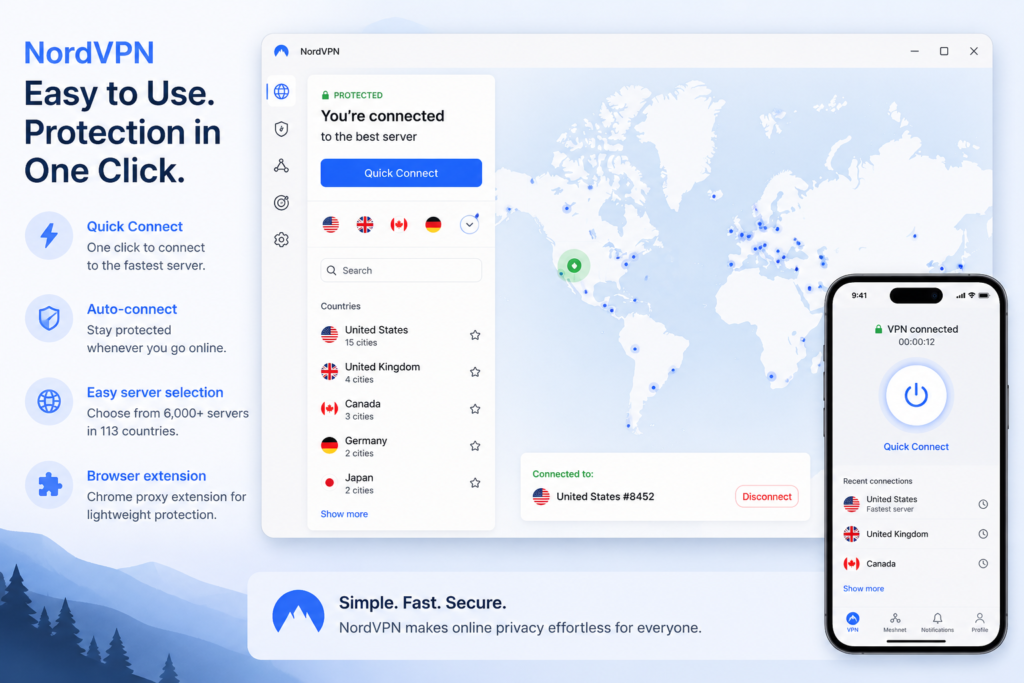
NordVPN is designed with simplicity in mind. Its apps feature:
- A clean, intuitive interface
- A Quick Connect button for instant protection
- Auto‑connect options
- Easy server selection
- A Chrome proxy extension for lightweight browsing protection
Even beginners can typically get set up NordVPN in minutes.
Pricing & Plans
NordVPN offers several subscription tiers, each adding more cybersecurity tools on top of the core VPN service. As with most VPNs, longer subscription terms bring the average monthly cost down.
- Basic — the core NordVPN service: secure browsing, fast servers, and essential privacy features. Sufficient for most everyday users, and generally the best balance of price and features if a VPN is all you need.
- Plus — everything in Basic, plus the NordPass password manager and data breach monitoring.
- Complete — everything in Plus, plus encrypted cloud storage through NordLocker.
Availability of specific plans and bundles can vary by region. Rather than focusing only on the monthly price, it’s worth weighing the overall value — a longer-term plan usually offers meaningful savings over paying month to month if you plan to use a VPN regularly.
Free Trial and Money-Back Guarantee
NordVPN doesn’t offer a traditional free plan, though Android users subscribing through the Google Play Store may be eligible for a limited free trial.
For all customers, every subscription purchased through NordVPN’s official website is backed by a 30-day money-back guarantee. This allows you to try the service with minimal risk and request a refund if it doesn’t meet your expectations.
Which Plan Should You Choose?
For most people looking for the best VPN for everyday use, the Basic plan offers the best balance of price and features. If you also want a password manager or encrypted cloud storage, one of the higher tiers may offer better value by bundling those tools into a single subscription.
NordVPN vs Competitors
| Feature | NordVPN | Surfshark | ExpressVPN |
|---|---|---|---|
| Best for | Overall security | Budget | Simplicity |
| Server network | Very large | Large | Moderate |
| Devices per account | 10 | Unlimited | 10 to 14 |
| Kill Switch | Yes | Yes | Yes |
| Multi-hop tool | Meshnet + Double VPN | Yes | No |
| Speed | Excellent | Very good | Excellent |
| Value | Excellent | Excellent | Premium pricing |
Note: Exact server counts change often and are best checked on each provider’s site before you buy; the comparison above reflects general positioning rather than a live count.
Pros and Cons at a Glance
What We Like ✅
- Massive server network
- Excellent speeds with NordLynx
- Excellent streaming support
- Strong security and encryption
- Independently audited no-logs policy
- Double VPN for extra privacy
- Easy‑to‑use apps
- Router support
- Reliable performance
- Good deals and money‑back guarantee
What We Don’t Like ❌
- Threat Protection Pro isn’t a full antivirus replacement
- Router setup can be tricky depending on ISP
- Double VPN can slow speeds slightly
- Monthly (non-discounted) pricing is on the expensive side
- Some advanced features are Windows-only
Is NordVPN Worth It?
Who Should Buy It
NordVPN is an excellent choice for:
- Users who want strong privacy
- Streamers who need global content access
- Travelers who frequently use public Wi-Fi in airports, hotels, and cafés
- Households with many devices
Who Might Skip It
NordVPN may not be ideal for:
- Users who need enterprise‑level antivirus
- Those who prefer ultra‑minimalist VPN apps
Conclusion
NordVPN remains one of the strongest all-around VPNs for everyday users in 2026, particularly if you want an easy setup without sacrificing security.
The main trade-off is price: if you’re only after basic protection and don’t need features like Double VPN or Meshnet, a cheaper competitor may cover your needs just as well. But for anyone who wants headroom to grow into more advanced privacy tools later, NordVPN is a safe bet.
Overall, this NordVPN Review found that the service remains one of the strongest VPNs available for everyday users.
Frequently Asked Questions
Is NordVPN worth it in 2026?
Yes, for most users. NordVPN continues to offer an excellent balance of speed, security, privacy, and ease of use, making it one of the best VPNs for most users.
Is NordVPN safe?
Yes. It uses industry-standard encryption, supports secure VPN protocols, includes features such as Kill Switch and Threat Protection, and follows an independently verified no-logs policy.
Can NordVPN be trusted?
NordVPN’s no-logs policy has undergone multiple independent audits and the company is headquartered in Panama, a country without mandatory data-retention laws.
Does NordVPN slow down internet speeds?
All VPNs introduce some overhead, but NordVPN’s NordLynx protocol keeps the slowdown minimal. Most users notice little difference during everyday browsing, streaming, or video calls.
Can I use NordVPN for streaming?
Yes. NordVPN works well with many popular streaming services and offers a large network of servers across numerous countries, helping provide reliable performance.
Can I use NordVPN on multiple devices?
Yes. A single subscription supports up to 10 devices at once, including Windows, macOS, Android, iPhone, Linux, smart TVs, and routers.
Is NordVPN good for beginners?
Yes. The apps are easy to install and use, with features like Quick Connect that automatically pick the fastest available server for you.
Can NordVPN be used for online banking?
Yes, it can improve security on public Wi-Fi in particular, though you should still follow normal safe-banking practices on top of it.