Your master password is the single point of failure in your digital life; if it’s hacked, your entire vault is exposed.
If your master password is hacked, an attacker can unlock your entire password vault and access every stored credential. But strong master passwords, 2FA, secure devices, and fast response steps can prevent or limit damage. This guide explains what hackers can access, how they steal master passwords, what to do immediately, and how to protect yourself long‑term.
The Essentials of Master Password Security
- The Risk: If your master password is stolen, a hacker can decrypt your entire vault and steal every login, credit card, and private note you own.
- The Defense: Use a Zero-Knowledge password manager and enable MFA/2FA immediately.
- The Recovery: If you suspect a breach, change your master password, reset your 2FA, and rotate your most sensitive passwords (banking, email).
- Best Practice: Use a 16+ character passphrase and a hardware security key or authenticator app rather than SMS-based codes.
Quick Answers
What happens if your master password is hacked?
If a hacker obtains your master password, they can gain access to your encrypted vault, decrypt your data, and steal all stored credentials, including usernames, passwords, credit card details, and private notes.
How do I protect my password manager vault?
To protect your vault, you should use a long, unique passphrase (16+ characters), enable Two-Factor Authentication (2FA) using an authenticator app, and choose a provider that uses a zero-knowledge security model.
The Paradox of Password Security
Password managers make online life easier by securely storing your passwords, credit card details, and sensitive notes. The convenience of a password manager is unmatched. You no longer need to remember dozens of complex strings; instead, they are stored securely in a digital vault.
All you need to remember is one master password — the key that unlocks your encrypted vault. But what happens if that master password is hacked?
The short answer: a hacker could access everything inside your vault. The good news: with the right security practices, you can prevent this or minimize the damage.
- The Essentials of Master Password Security
- The Paradox of Password Security
- How Hackers Can Steal Your Master Password
- How Password Managers Protect You (Zero‑Knowledge Security)
- Real‑World Example: What We Learned from the LastPass 2022 Breach
- What to Do Immediately If You Suspect a Breach
- How to Protect Your Master Password (Best Practices)
- Summary
The Worst-Case Scenario: What Hackers Can Do
If you are not diligent in securing that one key, the risk of a total account compromise remains. At worst, a malicious actor who gains access to your vault using your master password can steal everything inside.
Decrypting the Vault
Because your master password serves as the cryptographic key to unlock your data, once a hacker has it, they can bypass the encryption entirely. Your data, which was once a scrambled collection of characters, becomes readable plain text.
Stealing All Stored Information
A hacker with access to your vault can see more than just your Netflix login. They can access:
- Banking and Financial Credentials: Granting them the ability to initiate transfers or change account details.
- Credit Card Information: Stored for “auto-fill” convenience.
- Private Notes: Often containing sensitive information like safe combinations, PINs, or health data.
- Email Access: Which allows them to reset passwords for any other account not stored in the manager.
The NCSC guidance on password managers explains both the benefits of password managers and the risks of master password compromise.
How Hackers Can Steal Your Master Password
There are many ways hackers can steal master passwords:
- Phishing: You might receive a sophisticated email claiming your password manager account is locked, leading you to a fake login page that captures your master password.
- Keyloggers: Malware installed on a public or compromised computer can record every keystroke you type, including your master password.
- Credential Stuffing: If you use your master password for any other account (like social media or a shopping site) and that site is breached, hackers will try that same password on your password manager.
- Device Theft: If your device is unlocked or poorly protected, attackers may access your vault.
- Password Reuse: If you reuse your master password elsewhere and that service is breached, attackers can try the same password on your password manager.
- Weak Master Passwords: Short or predictable passwords can be brute‑forced.
How Password Managers Protect You (Zero‑Knowledge Security)
Most reputable password managers use a zero‑knowledge architecture, meaning:
- They never store or see your master password
- Your vault is encrypted locally on your device
- Even if the company’s servers are breached, attackers only get encrypted data, not readable information
In this model, the company never knows your master password and cannot access your encrypted data. The encryption process happens on your local device before it is ever sent to the provider’s servers. Consequently, even if the provider’s servers are hacked, the data the thieves find will be unreadable and useless.
This design ensures that only you can decrypt your vault.
Real‑World Example: What We Learned from the LastPass 2022 Breach
The LastPass 2022 incident is often referenced in discussions about password‑manager security, not because password managers are unsafe, but because it highlights why strong master passwords and 2FA matter.
In this case, attackers gained access to encrypted customer vault backups after compromising an employee’s account. Importantly, the vaults themselves remained encrypted — LastPass did not have access to users’ master passwords, and the attackers did not obtain them either.
The only way to decrypt those vaults would be for an attacker to guess or brute‑force each user’s master password individually, which is extremely difficult when users follow strong‑password best practices.
The incident also demonstrated how password‑manager security is a shared responsibility. LastPass strengthened its internal security controls afterward, and the event reminded users to ensure their master passwords are long, unique, and complex.
It also reinforced the value of enabling 2FA and regularly updating sensitive account passwords. Rather than being a reason to avoid password managers, the LastPass breach serves as a practical example of why layered security — strong master passwords, device protection, and multi‑factor authentication — is essential for keeping your vault safe.
How to Minimize the Risk of Your Master Password Being Hacked
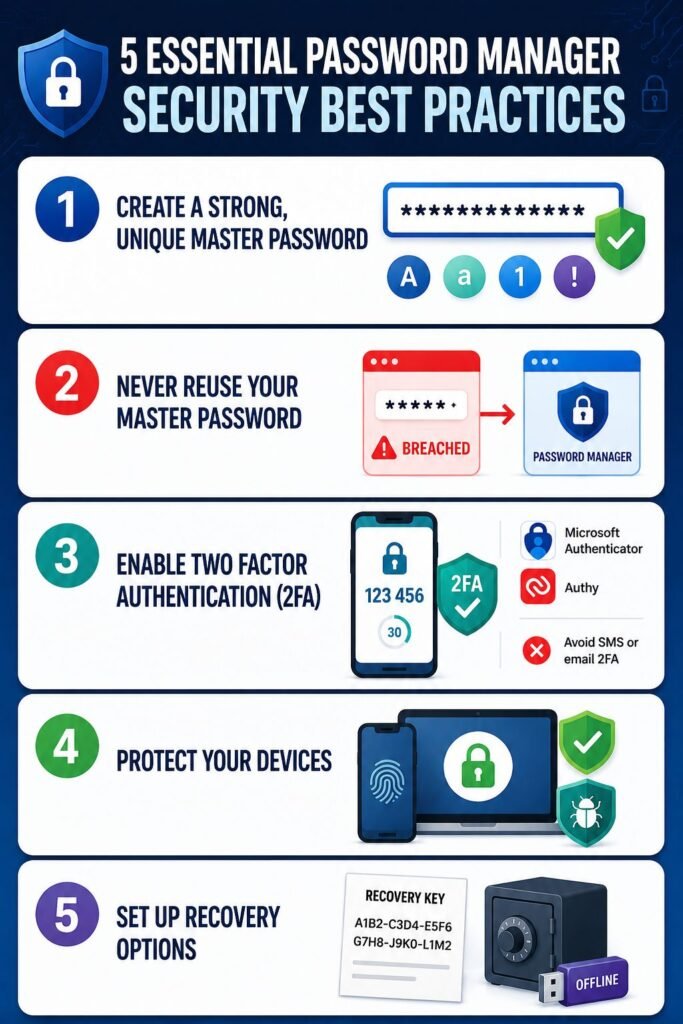
Create a Strong, Unique Master Password
Use at least 16 characters, including uppercase, lowercase, numbers, and symbols. A memorable passphrase works best, such as: 8OrangeDogsFlyInTandem&FallIntoLake9!
Never Reuse Your Master Password
If another service is breached, your password manager becomes vulnerable.
Enable Two‑Factor Authentication (2FA)
This is non‑negotiable. Use an authenticator app like Microsoft Authenticator or Authy. Avoid SMS or email 2FA when possible.
Protect Your Devices
Use:
- Biometric unlock (fingerprint/Face ID)
- Strong device PIN
- Automatic screen lock
- Anti‑malware protection
Set Up Recovery Options
Store your recovery key or emergency kit in a secure offline location.
What to Do Immediately If You Suspect a Breach
If you think your master password has been compromised, it is not “the end of the world,” but you must act with extreme speed.
- Change the Master Password: Use a trusted, clean device and create a new, long, unique password.
- Reconfigure 2FA: Reset your 2FA settings to ensure any old 2FA “sessions” are invalidated to prevent unauthorized access.
- Change Critical Passwords: Immediately change passwords for your bank accounts, primary email, cloud storage, social media, and any site containing financial data.
- Monitor Your Accounts: Closely monitor your bank statements and login history for any unauthorized transactions or activity.
How to Protect Your Master Password (Best Practices)
To protect the contents of your vault, you should follow these industry-standard practices:
- Length Matters: Use at least 16 characters. While 12 is a minimum, 16 provides significantly higher resistance to “brute force” attacks.
- Use a Complex Passphrase: Instead of a random string of symbols, use a nonsensical combination of unrelated words, such as 8OrangeDogsFlyInTandem&FallintoLake9!. This is easier for you to remember but nearly impossible for a computer to guess.
- No Reuse: Your master password must be used only for your password manager.
- Enable Biometric: Use biometrics (Fingerprint or Face ID) or a strong PIN to lock your devices and apps. This ensures that even if your device is stolen, the thief cannot access the 2FA codes needed to enter your vault.
- Recovery Kits: Most managers allow you to generate a recovery key or kit. Store this in a secure, physical location—like a fireproof safe—in case you forget your master password.
Summary
A password manager is a powerful tool for digital safety and convenience. While your master password is a critical vulnerability, you can transform it into a fortress by choosing a strong passphrase and enabling multi-factor authentication. By following these best practices, you can ensure that even in the face of a security threat, your digital vault remains impenetrable.
Frequenly Asked Questions
Can a password manager company see my passwords?
No, if they use a zero-knowledge model. Your data is encrypted locally on your device using your master password before it is uploaded to their cloud.
Can someone hack my password manager?
Not directly. Password managers use strong encryption. The weak point is usually the user’s master password or device security.
Is it safe to write down my master password?
It is generally discouraged to write it down where others can see it. However, writing it on a piece of paper and storing it in a locked, physical safe or a bank deposit box is a valid way to ensure you don’t lose access to your digital life.
Should I use my browser’s built-in password manager?
Dedicated password managers (like Bitwarden or 1Password) generally offer better security features, such as more robust 2FA options and zero-knowledge architecture, compared to basic browser storage.